Imagine gliding through Shinjuku Station’s bustling gates with just a simple tap of your phone—no paper tickets, no fumbling for coins, and no language barriers. A Suica card is arguably the most essential tool in any Japan traveler’s kit, serving as your golden ticket to trains, buses, and even vending machine snacks. In this guide, I’ll walk through how international travelers can obtain and use this essential travel tool, how it integrates with mobile wallets, and what you should know about reloading and managing funds. Whether it’s your first trip or a return visit, this article will help you move around Japan smoothly and efficiently.
What is Suica Card?
Suica (pronounced "soo-ee-kah") is a rechargeable contactless IC card used primarily for transportation and electronic payments in Japan. It was originally launched by JR East (East Japan Railway Company) in 2001.Suica is one of the most famous and widely used cashless systems in the country.Think of it as a combination of a metro/subway pass, train ticket, bus pass, debit card, and digital wallet, all in one small plastic card (or now, on your smartphone).With one, you no longer need to buy tickets from ticket vending machines. Simply tap your Suica card onto the ticket gate and the fare will automatically be deducted from the card’s balance.They can also be used to pay for things with e-money.
🔺Key Features & Uses:
1. Primary Use: Public Transportation
-
You can tap in and tap out at train station gates (subway, JR lines, private railways) and on buses.
-
It automatically calculates the correct fare for your journey, which is much more convenient than buying a paper ticket for each trip.
-
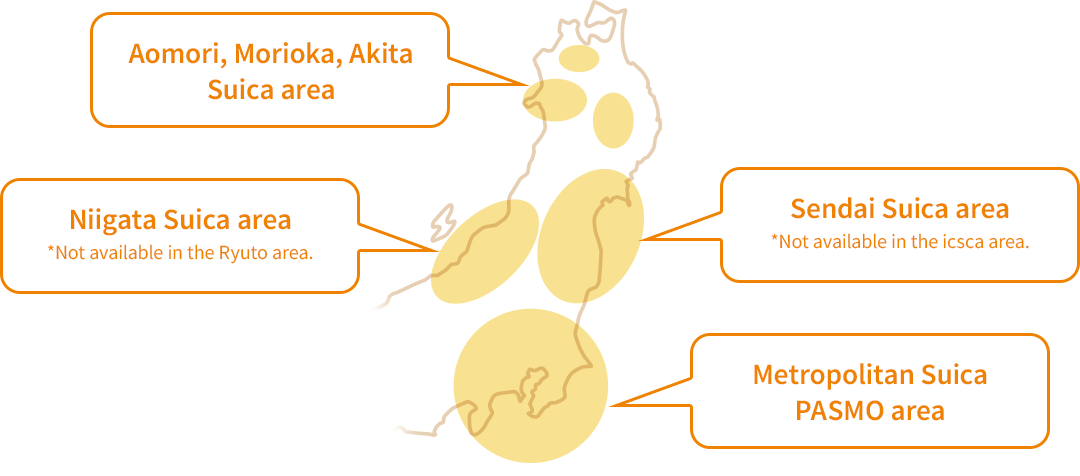
It works across most major transportation networks in Japan, not just in Tokyo but in many other cities (where compatible with other IC systems like PASMO, ICOCA, etc.).
2. As an Electronic Wallet (E-money)
Suica is widely accepted as a form of payment at millions of locations:
-
Convenience Stores: 7-Eleven, Lawson, and FamilyMart.
-
Vending Machines: Almost every vending machine in Japan with an IC reader.
-
Retail & Dining: Drugstores, supermarkets, fast-food chains (like McDonald's), and many station-based restaurants.
-
Coin Lockers: Use your Suica to pay for and "lock" station lockers; your card becomes the digital key.
3. Physical vs. Digital Versions
Depending on your needs, there are several ways to carry a Suica:
-
Physical Card: The classic, durable plastic card. For visitors, the unregistered version is easily purchased from ticket vending machines.
-
Mobile Suica (Digital): Can be added to smartphones:
-
iPhone: Added directly to Apple Wallet (Felica chip equipped). Can be charged instantly via Apple Pay/credit card.
-
Android: Via official apps (requires device with Felica/Osaifu-Keitai capability).
-
-
Special Tourist Versions:
-
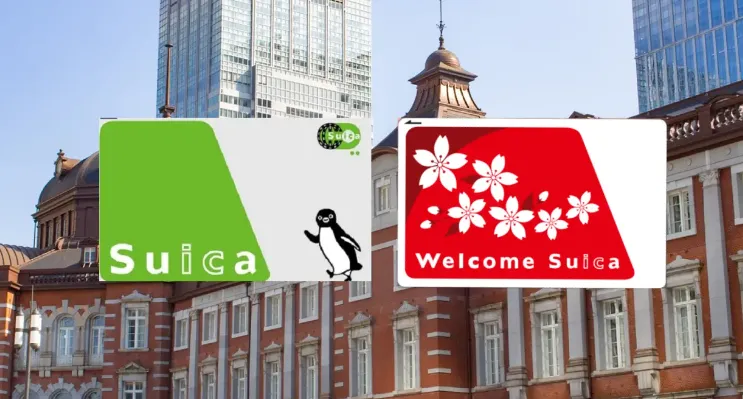
Welcome Suica: Designed for short-term visitors. Valid for 28 days, no deposit refund required, making them hassle-free souvenirs.
-
|
Feature |
Regular Suica (Physical) |
Welcome Suica (Tourist) |
Mobile Suica |
|
Platform |
Physical Card |
Physical Card |
Apple Wallet / Google Wallet |
|
Validity |
10 years |
28 days |
Ongoing |
|
Deposit |
¥500 (Refundable) |
None |
None |
|
Top-up |
Cash at stations |
Cash at stations |
Credit Card / Apple Pay |
|
Refunds |
Refundable (minus fee) |
No refunds |
N/A |
|
Who is it for? |
Residents / Long-term |
Short-term tourists |
Everyone (iPhone/JP Android) |
4. Convenience & Ease of Use
-
Easy Purchase & Top-Up: Cards can be bought and recharged ("charged") with cash at station vending machines or convenience store counters.
-
No Need for Exact Change: Saves time and hassle when commuting or shopping.
-
Balance Protection (for Registered Cards): Registered cards (for residents) can be reissued with the balance restored if lost. (Unregistered/tourist cards cannot).
-
Automatic Recharge (for Mobile Suica): Set up auto-recharge on your smartphone when the balance falls below a set amount.
5. Additional Smart Features
-
Commuter Pass Integration: Residents can load a monthly commuter pass directly onto the same Suica card.
-
Ekirin (Bicycle Parking): Can be used to pay for bicycle parking at many stations.
-
Locker Rental: Some coin lockers at stations now accept Suica for payment.
-
Loyalty Points: Some stores or chains offer point programs linked to Suica payments.
Where and How to Get a Suica Card?
A. Physical Suica Card
1. The Standard Physical Card (Green Suica)
As of 2025/2026, the shortage of IC chips has resolved, and regular "unnamed" green Suica cards are once again available at most major JR East stations.This card is valid for 10 years from your last use, making it better if you plan to return to Japan. You can return it to a JR ticket office before you leave to get your ¥500 deposit back.
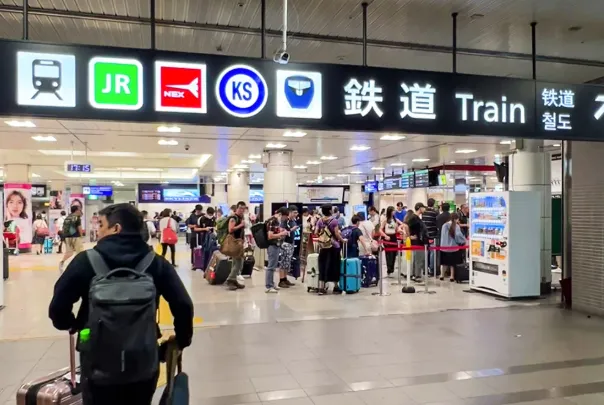
Where to buy:
-
Airports:
-
Narita Airport (JR East Travel Service Center, ticket machines).
-
Haneda Airport (JR East Travel Service Center, ticket machines).
-
Kansai Airport (for JR West ICOCA, but Suica is often available at JR East counters).
-
-
Train stations:
-
JR East stations across Tokyo and surrounding areas.
-
Ticket vending machines or staffed service counters.
-
Cost: ¥1,000–¥10,000 (includes a ¥500 refundable deposit).
Steps:
-
Go to a JR East ticket machine or service counter.
-
Choose “Purchase Suica”.
-
Pay the total cost: 2,000 JPY (includes 500 JPY deposit + 1,500 JPY usable balance).
-
Receive your card and check your initial balance.
2. The Tourist Physical Card (Welcome Suica)
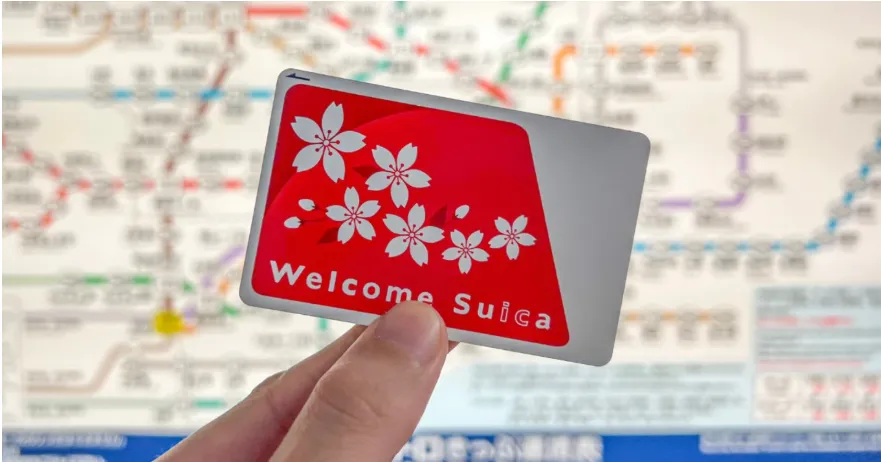
If you want a physical card but don't want to pay a deposit, get the Welcome Suica. It features a cherry blossom design and is yours to keep as a souvenir.This card expires after 28 days, and any remaining balance is non-refundable. Use it all before you leave!
Where to buy:
-
Airports: Welcome Suica vending machines and JR East Travel Service Centers at Haneda and Narita airports.
-
Major Stations: JR East Travel Service Centers at Tokyo, Shinjuku, Shibuya, Ikebukuro, and Ueno,JAPAN RAIL CAFÉ, and TAKANAWA GATEWAY Travel Service Center.
-
Rakuten Travel / Klook: You can also buy Welcome Suica from these sites.
Cost: ¥1,000–¥10,000.No deposit is required. You simply pay for the balance you want (e.g., ¥2,000).
Process:
-
Select English on ticket machine.
-
Choose "Suica purchase".
-
Insert money (initial top-up required).
-
Collect card and receipt.
>>Click for more purchase informartion
B. Mobile Suica
Mobile Suica is a digital version of Suica that works on your phone.
‼️Requirements:
-
iPhone with Apple Wallet (iOS 16.4+ recommended) or Android with Google Wallet / Mobile Suica app.
-
Japanese region Apple ID may be required for full features.
1. Add Suica to Apple Wallet
For iPhone users, this is the easiest way to travel. You can either create a new digital card or transfer a physical card you already have.
✔️To Create a New Card:
-
Open the Wallet App on your iPhone.
-
Tap the "+" (Add) button in the top right corner.
-
Select Transit Card.
-
Search for "Suica" (or Pasmo).
-
Tap Continue.
-
Select the amount you want to add (e.g., 1,000 yen).
-
Pay using your stored Apple Pay credit card (Visa, Mastercard, or Amex).
⚠️Note: Some Visa cards issued outside Japan may fail. If this happens, try a Mastercard or Amex.
✔️To Transfer a Physical Card:
-
Follow steps 1–3 above, then select Transfer Existing Card.
-
Enter the last 4 digits of your physical card number.
-
Place the top of your iPhone on the card. Do not move it until the transfer is 100% complete.
⚠️Note: Once transferred, your physical card is permanently deactivated and can be recycled.
2. Add Suica to Google Wallet
-
On your device, open the Google Wallet app .
-
At the bottom, tap Add to Wallet.
-
Tap e-money.
-
Select the e-money card that you want to add.
-
Follow the on-screen instructions.
How to Use Suica?
Using Suica is "Touch and Go."
A. Using Suica for Transportation
-
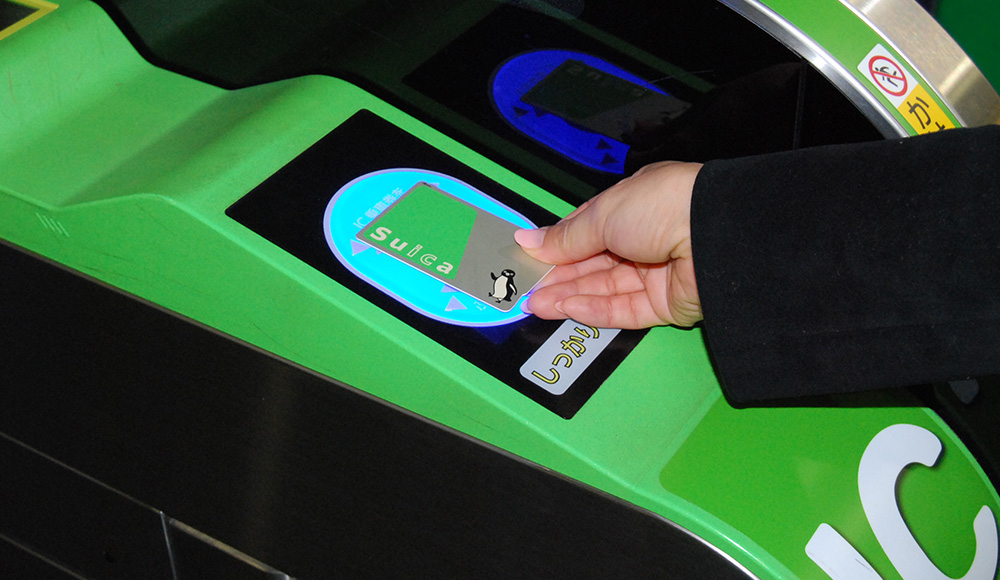
Trains & Subways: Tap your phone or card on the blue glowing reader at the ticket gate when entering and when exiting. The screen will show your remaining balance.
-
Enter station: Tap on ticket gate (look for Suica logo).
-
Exit station: Tap again - fare automatically deducted.
-
Transfer: Works seamlessly between different train companies.
-
-
Buses: In Tokyo, you usually tap once at the front door (flat fare). In other cities, you may need to tap when boarding at the back and again when exiting at the front.
Suica can also work for airport transfers (Narita Express, Keisei Skyliner, etc.).
B. Using Suica for Shopping
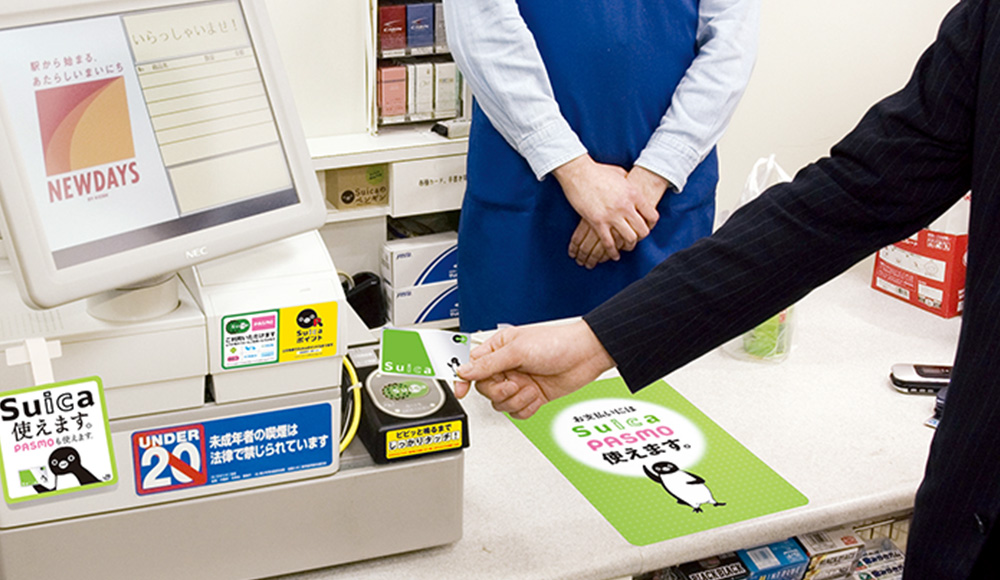
Look for the Suica/IC logo at convenience stores (7-Eleven, Lawson, FamilyMart), vending machines, and some restaurants. Tell the cashier "Suica de" (by Suica) and tap the reader.
-
Look for Suica logo or "IC" symbol.
-
Tap card/phone at register.
-
Balance automatically deducted.
-
Get receipt showing remaining balance.
How to Top Up Suica?
The maximum balance allowed on any Suica card is ¥20,000.
On iPhone (Recommended):
-
Open the Wallet app, tap your Suica, and tap Add Money.
-
Select the amount and confirm with FaceID/TouchID.
⚠️Tip: Use a Mastercard or Amex. Some international Visa cards still have occasional compatibility issues with Suica in-app top-ups.
With Cash (at Stations):
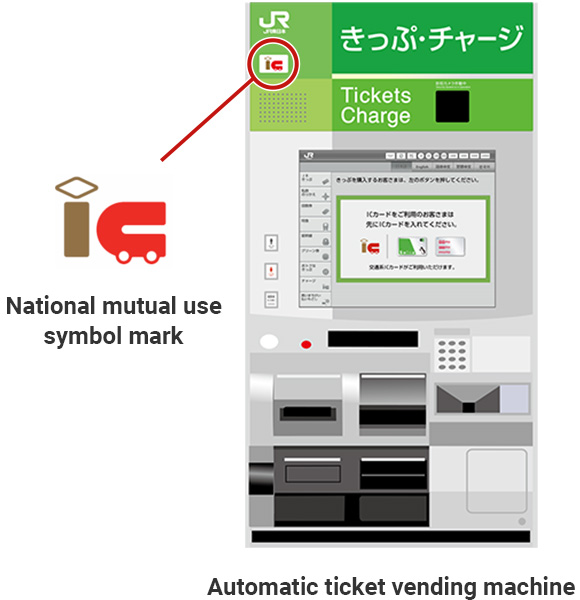
When your card balance is low, you can top up using cash at regular and multifunctional ticket machines as well as well fare adjustment machines that have the nationwide mutual use symbol.
-
Look for "Ticket" or "IC Charge" machines at any station.
-
Physical Card: Insert the card, select the amount, and insert JPY cash.
-
Mobile Suica: Look for machines with a tray or cradle (rather than a slot). Place your phone in the cradle, select "Charge," and insert cash.
At Convenience Stores (Konbini):
-
Go to the counter at 7-Eleven, Lawson, or FamilyMart.
-
Say: "Suica charge, onegaishimasu."
-
Tap your phone/card, pay the clerk in cash, and tap again to confirm.
How to Get a Suica Refund?
1. Digital Suica (Apple Wallet)
📍Refund Status: Very Difficult for Tourists
-
The Problem: To officially "refund" a digital Suica and get the cash back, the system requires a Japanese bank account.
-
The Workaround: Since most tourists don't have one, the standard advice is to "drain the balance." How to drain it: Use your Suica at a convenience store or airport shop for a purchase that costs more than your remaining balance. Tell the cashier: "Suica and [Cash/Credit Card] please." They will swipe your Suica to zero and let you pay the remaining few yen with another method.
2. Welcome Suica (Red Tourist Card)
📍Refund Status: Non-Refundable
-
The Rule: These cards were designed specifically to avoid the refund process. There is no way to get money back from a Welcome Suica.
-
Expiry: The card and all remaining funds expire automatically after 28 days.
-
Best Move: Spend your last few yen on a drink at a vending machine or snacks at the airport before you fly out.
3. Regular Physical Suica (Green Card)
📍Refund Status: Refundable (with a fee)
If you have a standard plastic Suica (not the 28-day version), you can get your money back at any JR East Ticket Office (look for the Midori-no-madoguchi or the green sign).
-
The Calculation: (Remaining Balance - ¥220 Fee) + ¥500 Deposit = Total Refund.
-
Pro Tip: If your balance is less than ¥220, you won't be charged extra, but you won't get any of that balance back either—you will simply receive your full ¥500 deposit.
-
Strategy: Try to spend your balance down to as close to zero as possible before heading to the ticket office to maximize your refund.
Essential Tips
-
Interoperability: Suica is part of Japan's national "IC Card" network. This means you can use a Suica card in Osaka (where ICOCA is local) or a Kyoto ICOCA card in Tokyo. They all work interchangeably for travel and shopping across the country.
-
Not a Discount Pass: Suica itself is not a discounted travel pass (like the Japan Rail Pass). It's a convenient way to pay for individual trips. You still pay the standard fare for each ride.
-
One Card per Person: You cannot tap one card for multiple people at a ticket gate; every traveler needs their own.
-
No Shinkansen (mostly): While great for local trains and subways, you generally still need separate paper tickets (or a specific app link) for the high-speed Shinkansen (Bullet Train).
-
The "One Device" Rule: If you transfer a physical Suica card to your Apple Wallet, the physical card becomes void and can be thrown away. You cannot use both.
-
Low Battery: On iPhones, "Power Reserve" allows you to use your Suica for a few hours even after your phone battery "dies."
Suica Card Q&A
Can tourists use Suica cards outside Tokyo?
Yes. Suica works with most IC cards (PASMO, ICOCA, PiTaPa, etc.), so it can be used across Japan for trains, buses, and shopping.
How do I check my balance?
-
Physical card: Ticket machines, convenience store terminals, or station gates
-
Mobile Suica: Check in the app or Apple Wallet / Google Wallet
What if I lose my Suica card?
-
Physical card: Balance can be recovered only if registered. Unregistered cards are non-refundable.
-
Mobile Suica: Use your app account to transfer balance to a new device.
Can I use Suica with a JR Pass?
Yes. Suica can complement the JR Pass for local travel. Use Suica for subway and bus rides or outside JR lines while the JR Pass covers long-distance trains.
Can I use Mobile Suica when my iPhone battery is dead?
YES! This is the magic of Express Transit mode. Once set up, Suica works even in:
-
Power reserve mode (up to 5 hours after "dead" battery warning)
-
Airplane mode
-
Phone turned off (recent models). Enable in: Settings → Wallet & Apple Pay → Express Transit Card
Can I have both physical and Mobile Suica?
No - each Suica has a unique ID. You can transfer balance from physical to mobile via the "Mobile Suica" app (Japanese only, complex process). Most tourists choose one or the other.
How do I get a Suica for my child?
Children (ages 6–11) pay half price.
-
Physical: You must go to a JR Ticket Office (Midori-no-madoguchi) with the child’s passport. They will issue a special "Child Suica."
-
Digital: As of early 2026, setting up a child's digital Suica on an international iPhone is still complex (usually requiring a "Family Sharing" setup or a Japanese Apple ID). Most parents find it easier to get a physical Child Suica.
My card "errored out" at the gate. What do I do?
Do not try to force it. Take your card/phone to the Station Assistant (usually in a glass booth next to the gates). They will scan it and "reset" it. This usually happens if you didn't tap correctly at your starting station.
Can I use one Suica for two people?
No. Every traveler (including children over 6) must have their own individual Suica. You cannot tap once and pass it back to the person behind you.
Can I extend my Welcome Suica validity?
No - 28 days is fixed.
Can I use foreign credit cards to top up?
-
At machines: NO - cash only
-
Apple Wallet: YES but Mastercard/Amex work best; Visa often fails
-
Android Mobile Suica: Japanese cards only