Public transportation in Japan is fast, efficient, and incredibly reliable—but understanding the fare system can feel overwhelming at first. A contactless travel card simplifies the entire experience, allowing visitors to tap and go across major cities like Osaka and Kyoto. In the evolving landscape of Japan’s digital payments, the ICOCA card remains the undisputed king for anyone landing in Osaka or Kyoto.Beyond just a ticket, this reloadable smart card opens doors to convenient transit and cashless convenience.Whether you’re a first-time visitor or a returning explore, understanding the nuances of this regional powerhouse is key to a stress-free journey. This comprehensive resource dives into the ICOCA card—your all-in-one transit and payment companion. Learn how to purchase, recharge, and maximize its use across trains, buses, and everyday purchases, all while unlocking insider tips to stretch your yen further. Get ready to travel smarter, save time, and immerse yourself in the vibrant heart of Japan.
Part 1: What is ICOCA Card?
The ICOCA card is a rechargeable IC transit card issued by JR West, widely used for trains, subways, buses, and even shopping in the Kansai region (Osaka, Kyoto, Kobe, etc.). The name is a play on the Japanese phrase "Iko ka?", which translates to "Shall we go?" It works like other Japanese IC cards (Suica, PASMO) and is interoperable nationwide — once you have one, you can use it throughout most of Japan where IC is accepted.
🔑 Key Features:
-
Tap-and-Go: No need to buy individual tickets. Tap at ticket gates for JR West, Kansai subways, private railways, and buses; fares deducted automatically.
-
Nationwide Compatibility: Even though it's an "Osaka card," it works across almost all of Japan, including Tokyo, Nagoya, and Fukuoka.
-
Electronic Wallet: Beyond trains and buses, you can use it to pay at convenience stores, vending machines, coin lockers, and many restaurants.
-
Long Life: The card remains valid for 10 years from its last use, so you can save it for a future trip.
- Rechargeable: Add money (yen) at vending machines in stations.
💰 Cost & Mechanics:
-
Purchase Price: Typically ¥2,000.
-
¥1,500 is immediately usable balance.
-
¥500 is a refundable deposit you get back when you return the card.
-
-
Top-Up: You can "charge" the card at any station ticket machine or 7-Eleven ATM (using cash) up to a maximum balance of ¥20,000.
📱 Physical vs. Digital:
-
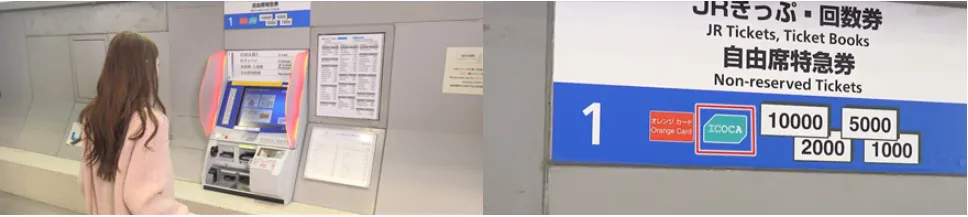
Physical Card: Sold at JR West stations (like Kansai Airport, Osaka, or Kyoto) via blue ticket machines.
-
Digital Card: iPhone users can add a "Transit Card" directly in their Apple Wallet. This is often easier for tourists because you can top it up using Apple Pay rather than searching for cash-only machines.
⁉️ Why Travelers Love It:
-
Saves time: No buying tickets for every ride.
-
Saves money: Always charges the correct fare, and some transfers are cheaper.
-
Convenient: Use it for transport, snacks, drinks, and small purchases.
-
Souvenir option: Cute designs (like the classic blue penguin or regional limited editions).
Part 2: Where & How to Buy ICOCA (Physical vs. Mobile)?
A. Physical Card (Best for Android Users & Souvenir Collectors)
1. Purchase Locations:
- At Kansai International Airport (KIX)
Buy your ICOCA card as soon as you land at JR West Ticket Offices or IC-compatible vending machines near the train platforms in the airport station. Some counters (like EasyGo) or tourist information centers may offer special tourist designs.
- Major JR West Stations
Purchase at JR West stations (Osaka, Shin-Osaka, Tennoji, Kyoto, etc.) from vending machines(look for the "ICOCA" logo) or the Midori-no-Madoguchi (Green Window) staffed ticket counter. Some private rail/subway stations also offer ICOCA sales, though availability can vary.
2. Process:
-
First, press button to change the display language to English.
-
Press "Purchase ICOCA."
-
Next, press the purchase amount.
-
Your card will be issued after the required amount is inserted. Make sure to take both the card and any change dispensed.
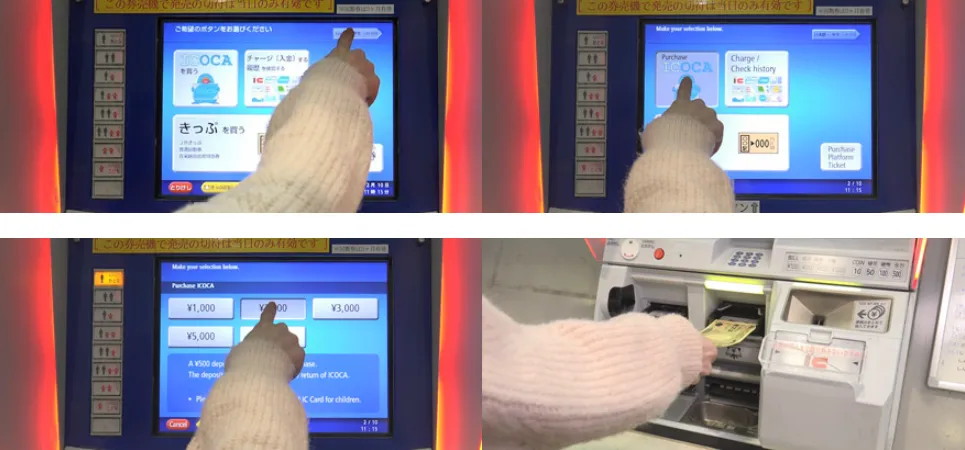
⚠️Note: Credit cards are generally not accepted for physical card purchases at machines; you will need cash (Yen).
B. Mobile ICOCA (Best for iPhone Users)
ICOCA can be added as an Apple Pay service on iPhones and Apple Watches.Simply add ICOCA to your Apple Wallet to use your iPhone or Apple Watch just like an ICOCA for simple and fast touch payments at train stations and stores.Payments are also protected by your device’s security features,while Face ID and other settings can be configured to increase the safety and privacy of the personal information on your ICOCA.
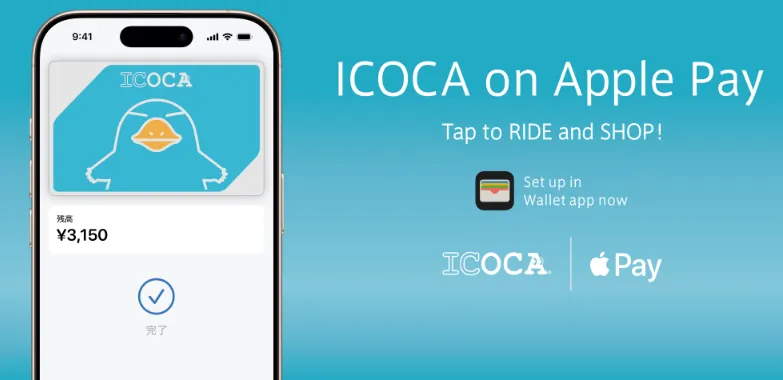
How to Set Up:
-
Make sure your device is compatible:
-
iPhone 8 or later with iOS 16.0 or later installed
-
Apple Watch Series 3 or later with watchOS 8.7.1 or later installed
-
Always keep the OS of your device updated to the latest version.
-
-
To add a card:
-
iPhone: open the Wallet app and tap the .
-
Apple Watch: on your iPhone, open the Apple Watch app and tap the My Watch tab. Then scroll down, tap Wallet & Apple Pay and tap Add Card.
-
-
Tap Travel Card.
-
Choose ICOCA to add.
-
Tap Continue.
-
Choose an amount to put on the card and tap Add.
-
Follow the steps on the screen to confirm your purchase and add ICOCA card.
Part 3: How to Use ICOCA?
🚉 On Trains and Subways
This is the most common use. It works for JR lines, Osaka Metro, and private lines like Hankyu or Keihan.
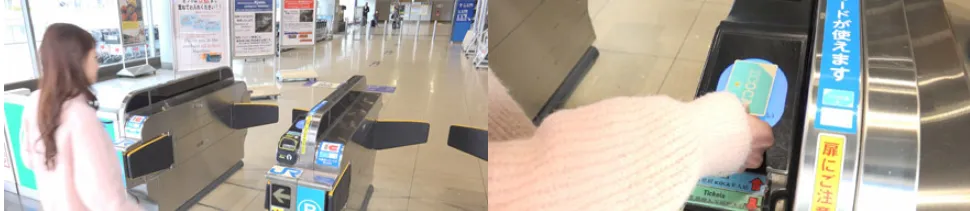
-
At the Departure Station: Find the ticket gates with a blue glowing card reader. Tap your card or phone on the reader. You will hear a beep, and the gate will open.
-
At the Destination Station: Tap again on the exit gate. The screen will show you:
-
The fare for that specific trip.
-
Your remaining balance.
-
⚠️Note:
-
If your balance is too low, the gate will beep loudly and close. You’ll need to use a "Fare Adjustment" machine located just before the gates to top up.
-
For certain limited-express trains or reserved seats (e.g., Shinkansen), you’ll need additional tickets. IC will only cover the base fare.
🚌 On Buses (Kyoto & Osaka)
Bus rules can be confusing because they vary by city:
-
In Osaka: Most buses have a flat fare. You typically tap once when you board (usually at the front door) or once when you exit.
-
In Kyoto: Many buses use a "distance-based" fare. You must tap twice:
-
Tap the reader next to the door when you board (usually the middle/back door).
-
Tap the reader next to the driver when you exit (front door). This ensures you are charged the correct amount for the distance traveled.
-
With just one card, travelers can use ICOCA for railways, buses, and other purchases not only throughout the ICOCA usage area but also in usage areas for Kitaca, PASMO, Suica, manaca, TOICA, PiTaPa, Hayakaken, nimoca, and SUGOCA.Check the Usage Area
🛍️ Shopping and Vending Machines
You can use ICOCA at almost any convenience store (7-Eleven, Lawson, FamilyMart), many station kiosks, and vending machines.
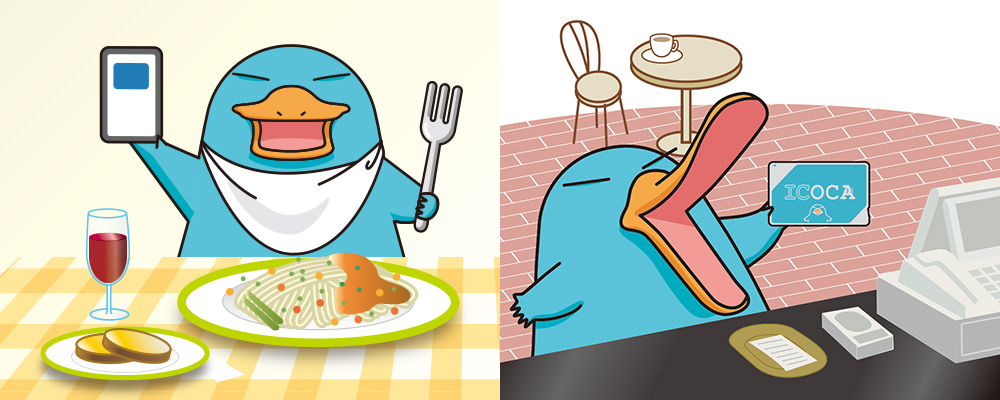
-
In Stores: Tell the clerk, "ICOCA de" (By ICOCA). When the reader lights up, tap your card.
-
Vending Machines: Select your drink first, then tap your card on the reader.
-
Coin Lockers: Many lockers at major stations use ICOCA as the "key." You tap to pay and lock, and then tap the same card later to unlock it.
ICOCA is accepted at more than 2,000,000 locations both inside and outside stations throughout Japan.Find Participating Stores
‼️Important Usage Rules:
-
One Person, One Card: You cannot "tap in" and then pass the card back to a friend. Every traveler must have their own card.
-
The "200km" Rule: You generally cannot use ICOCA for a single continuous trip longer than 200km (e.g., you can't tap in at Osaka and tap out in Tokyo).
-
Shinkansen (Bullet Train): You cannot use your ICOCA balance to pay for the Shinkansen by simply tapping. You must either buy a separate paper ticket or link your ICOCA to the "SmartEX" app in advance.
Part 4: How to Top Up (Add Value)?
Adding value (recharging) to your ICOCA is straightforward, but there is one golden rule: Physical cards can only be topped up with cash. Here is how to do it depending on which version of the card you have.
-
Maximum Balance: ¥20,000.
-
Minimum Top-up: Usually ¥1,000 at machines, though some "Fare Adjustment" machines allow as little as ¥10 or ¥100 increments to reach the exact fare.
A. Recharging a Physical Card (Cash Only)
You can top up at almost any train station in Japan or at convenience stores.
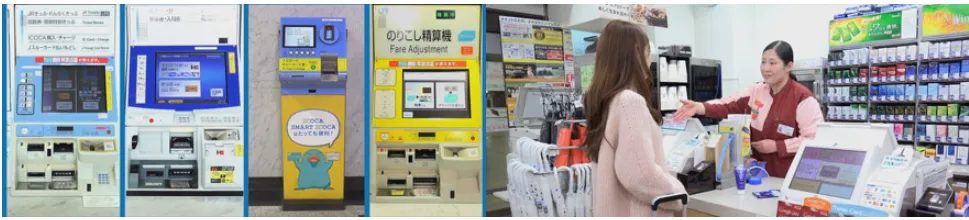
-
At Ticket Machines: Look for machines with the "IC" or "ICOCA" logo.
-
Select English on the top right of the screen.
-
Insert your card into the slot (or place it on the tray).
-
Select the "Charge" button.
-
Choose your amount (usually ¥1,000, ¥2,000, ¥5,000, or ¥10,000).
-
Insert the cash. Your card will pop back out with the new balance.
-
-
At Convenience Stores: Go to the register at any 7-Eleven, Lawson, or FamilyMart.
-
Say: "ICOCA charge, onegaishimasu" (ICOCA charge, please).
-
Show them the amount of cash you want to add.
-
Tap your card on the reader when prompted.
-
B. Recharging a Digital Card (Apple Wallet)
If you have ICOCA on your iPhone, you have two ways to add money:
-
Via Apple Pay: This is the most convenient method.
-
Open the Wallet app and tap your ICOCA card.
-
Tap "Add Money."
-
Enter the amount and confirm with Face ID/Touch ID.
-
⚠️Note: In 2026, most international Mastercards and Amex cards work perfectly. Some international Visas may still be rejected.
-
Using Cash at a 7-Bank ATM: Found inside every 7-Eleven.
-
Select "Recharge E-money" on the ATM screen.
-
Place your iPhone on the glowing reader tray.
-
Select the amount and insert your yen bills.
-
Part 5: Pro-Tips to Save Money
✅ The "ICOCA & Haruka" Combo
If you are arriving at Kansai Airport (KIX), do not buy a standard ticket. Go to the JR Ticket Office and ask for the ICOCA & Haruka deal. It provides a heavily discounted "Haruka" Express ticket to Osaka or Kyoto specifically for ICOCA holders.
✅ Kansai One Pass (Tourist Special)
Ask for the Kansai One Pass. It is a specially branded ICOCA card for tourists that works exactly like a normal card but grants you discounts or small gifts at major attractions like:
-
Osaka Castle
-
Umeda Sky Building
-
Various shrines and temples in Kyot
✅ Avoiding the "Fare Adjustment" Trap
If you enter a station but don't have enough balance to exit, look for the Fare Adjustment (Norikoshi) machines near the exit gates. You can pay the exact difference in cash there so the gate will let you through.
✅ Refund Before You Leave
Before flying out of KIX, go to the JR Ticket Office to return your physical card. You will get your ¥500 deposit back, plus any remaining balance (minus a ¥220 handling fee).Spend your balance down to ¥0 at an airport convenience store first; if the balance is ¥0, the handling fee is waived, and you get the full ¥500 back!
Part 6: Frequently Asked Questions (FAQ)
Does the ICOCA card expire?
It expires 10 years after its last use. If you plan to return to Japan in a few years, you can keep the card and use it again.
Can two people share one ICOCA card?
No. Every traveler must have their own card to "tap in" and "tap out." The only exception is if you are using the card as a wallet at a convenience store to buy items for multiple people.
Do children need their own card?
- Ages 0–5: Travel for free (up to two children per adult).
-
Ages 6–11: Need a Child ICOCA, which charges half the adult fare. These cannot be bought at machines; you must go to a JR ticket office (Midori-no-madoguchi) and show the child’s passport.
-
Ages 12+: Full adult fare.
Can I use ICOCA for the Shinkansen (Bullet Train)?
Not by simply tapping. You must either buy a separate paper ticket or link your ICOCA card to the SmartEX app to use it for Shinkansen entry.
What happens if I lose my card?
If it is a standard "Unregistered" card, the balance is lost. If you registered your card (or have a Child ICOCA), you can get it reissued at a JR ticket office for a fee, and your balance will be transferred.
How do I get my ¥500 deposit back?
You must return the physical card to a JR West ticket office (found in Osaka, Kyoto, or Kansai Airport).
-
The Math: They refund your balance + ¥500 deposit, but they charge a ¥220 handling fee.
-
Pro-Tip: If your balance is ¥0, the fee is waived, and you get the full ¥500 back. Spend your balance down to zero at a convenience store before returning the card!
Can I get a refund for an ICOCA in Tokyo?
No. You can use it in Tokyo, but you can only refund it in the JR West region (Osaka/Kyoto/Kobe/Nara).
Can I transfer my physical card to my iPhone?
Yes. Open Apple Wallet, tap (+), select "Transit Card," then "Transfer Existing Card." Rest your phone on the card to migrate the balance. Note: The physical card will become useless once transferred.
Does it work on Android?
Only on Android phones purchased in Japan. Most international Android models do not support the "FeliCa" chip technology required for Japanese transit.
Can I use ICOCA from airport to city?
Yes! From Kansai Airport (KIX):
-
To Osaka: On JR Haruka or regular trains
-
To Kyoto: On JR Haruka Express
-
Consider "ICOCA & HARUKA" discount package if heading straight to Kyoto
What about discounts for seniors/students?
Discounted fares typically require special passes purchased at ticket offices, not standard ICOCA.
Can I use ICOCA outside of the Kansai region?
Yes, ICOCA is interoperable with other major IC cards like Suica and PASMO.
Do I need to have an ICOCA card if I already have Suica or PASMO?
No! You can use Suica or PASMO cards in the Kansai region as well, as they are all compatible across Japan. However, if you're primarily traveling in Kansai or want to get a local discount or combo (like the Haruka + ICOCA deal), an ICOCA card could still be beneficial.
Can I use ICOCA with my foreign credit card?
No, ICOCA cards can only be topped up with cash, not with credit cards or debit cards (except via the mobile app in some cases).