Navigating Japan’s world-class transit system is one of the joys of visiting the country, and IC Cards (like Suica, PASMO, and ICOCA) are the key to unlocking it. These rechargeable cards work on almost all trains, subways, buses, and can even be used to buy drinks at vending machines, pay at convenience stores, and settle restaurant bills.However, knowing where and how to add value can save time, reduce stress, and prevent unexpected delays during your journey.Whether you're carrying a card in Apple Wallet or using a physical version purchased at a train station, this guide walks through the latest recharge options available in 2026. You'll discover supported payment methods, station machine instructions, convenience store alternatives, and expert tips for travelers who want a hassle-free experience throughout Japan.
Quick Facts

All major Japanese IC cards are interoperable and can generally be recharged using the same machines and stores.
Method 1: Recharge Using Apple Pay
This is the fastest and most convenient way to recharge—no queues, no cash machines, no hunting for the right slot.However, many travelers run into frustrating payment failures when trying to top up with international credit cards, or find themselves stuck wanting to use physical Japanese Yen (cash) to recharge their digital wallet.
f you get hit by the dreaded "Payment Not Completed" error, don't worry. Here is the ultimate guide to keeping your card loaded using Apple Pay workarounds and clever cash hacks.
Supported Cards:
-
Mobile Suica
-
Mobile PASMO
-
Mobile ICOCA
What You'll Need:
-
iPhone 8 or later (or iPhone 7 / 7 Plus for Suica specifically) with the latest iOS.
-
Apple Watch Series 3 or later (or Series 2 purchased in Japan).
-
An Apple Account with two-factor authentication enabled.
-
An eligible payment card in Apple Wallet (credit or debit card).
Typical Recharge Amounts:
-
¥1,000
-
¥2,000
-
¥3,000
-
¥5,000
-
¥10,000
Custom amounts are also available.
Steps:
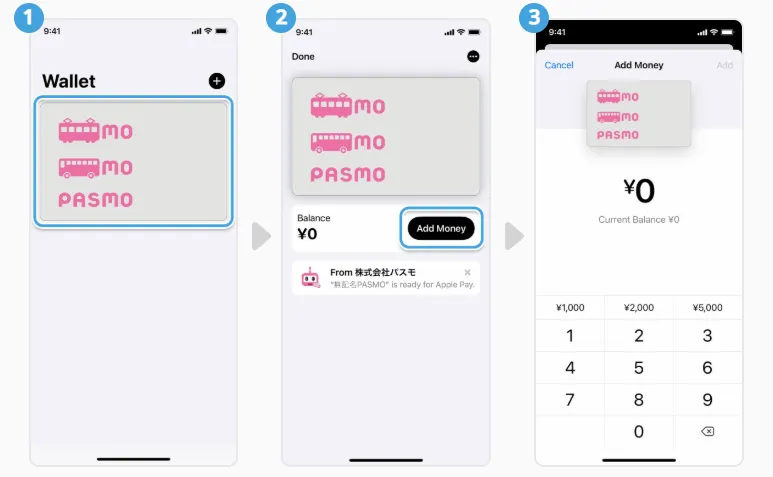
1. Topping up your Suica, PASMO or ICOCA card on your iPhone
-
In the Wallet app, tap your Suica, PASMO or ICOCA card.
-
Tap Add Money.
-
Choose the amount you want to add and tap Add.
-
Select the credit or prepaid card you want to use to pay and confirm the transaction with Face ID or Touch ID.
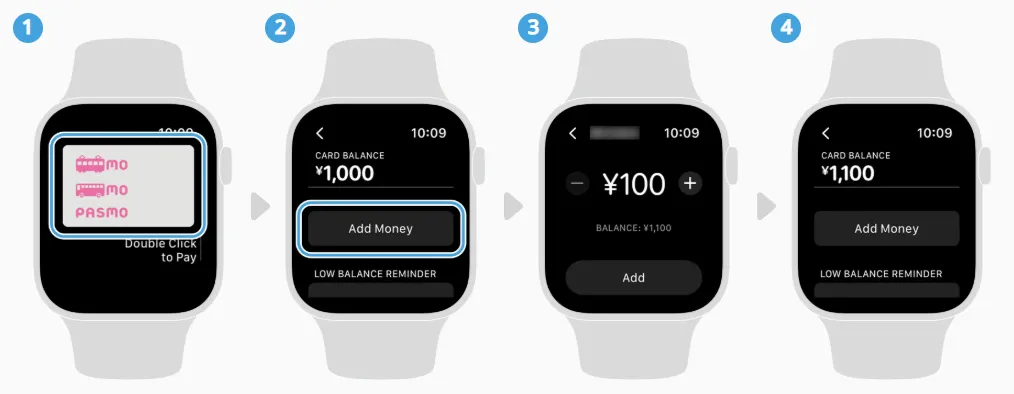
2. Topping up your Suica, PASMO or ICOCA card on your Apple Watch
-
In the Wallet app, tap your Suica, PASMO or ICOCA card.
-
Tap Add Money.
-
Follow the instructions on the screen.
⚠️ Note: Maintenance happens daily in Japan between 2:00 AM and 4:00 AM Japan Standard Time. During this window, digital recharges will fail universally. Avoid topping up in the middle of the night!
The Problem: Why Does My Direct Top-Up Fail?
If you receive a "Payment Not Completed" or "Card Not Activated" error, you are experiencing a known international payment block.
-
The Visa Block: The card payment network heavily restricts international Visa cards from loading Japanese transit cards directly in the Apple Wallet app.
-
The Location Lock: Some banking institutions block Apple Pay transactions initiated outside of Japan or flag sudden foreign transit recharges as fraudulent.
The Solutions & Workarounds:
-
Switch to Mastercard or AMEX: Mastercard and American Express historically have higher success rates with Apple Wallet transit recharges. Visa cards frequently fail unless your device is fully updated to iOS 17.2 or later, which rolled out native fixes for international Visas.
-
Turn on Location Services: Make sure Location Services are enabled for your Apple Wallet app (Settings > Privacy & Security > Location Services > Wallet). If you are trying to set up your card before leaving for Japan, sometimes the geolocation conflict blocks the charge. Try again once you physically land in Japan.
-
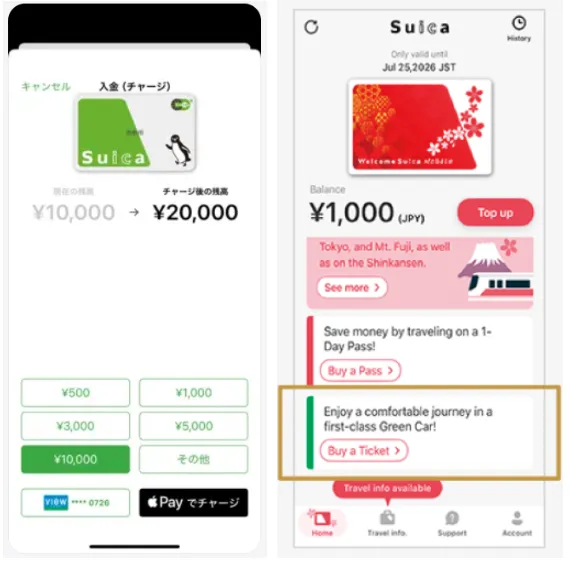
The "Suica App" Member Hack: If you only have a Visa card:
-
Download the official Suica App (iOS / Andriod) or the Welcome Suica Mobile App launched for tourists ((iOS). Registering your card directly through the app's dedicated gateway bypasses the standard Apple Pay block.
-
Register as a member inside the app (which can be done in English).
-
Register your international Visa card directly inside the app profile.
-
Initiate the top-up from inside the Suica app rather than the Apple Wallet app. The in-app processing engine often bypasses the strict Apple Wallet gateway blocks.
-
Method 2: Recharge at Station Ticket Machines
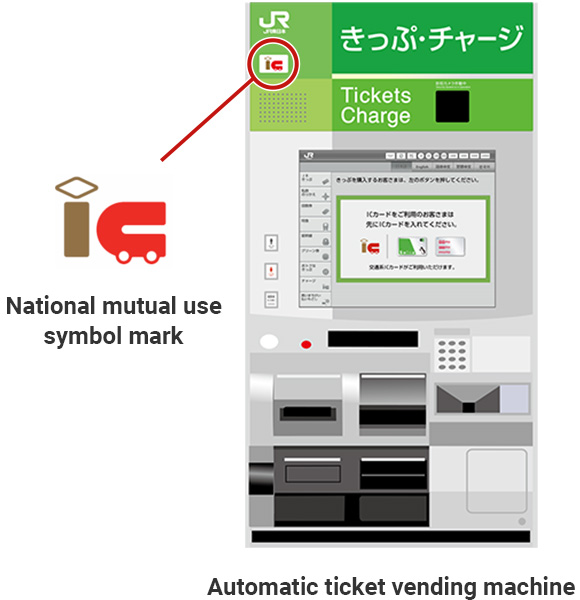
This is the traditional method and works for all physical IC cards.Many modern train and subway stations (especially JR stations in Tokyo, Osaka, and Kyoto) have upgraded their ticket kiosks. While older machines require you to physically insert a plastic card into a slot (which won't work for your phone), the newer "smart" machines feature a flat tray or a pocket with flashing lights designed for contactless reading.
Supported Cards:
Both physical cards and mobile cards.
Where to Find Machines:
-
JR stations
-
Tokyo Metro stations
-
Private railway stations
-
Subway stations
Most machines now offer English menus.
Typical Recharge Amounts:
-
¥500
-
¥1,000
-
¥2,000
-
¥3,000
-
¥5,000
-
¥10,000
💡 Good to Know: The absolute maximum balance any Japanese IC card can hold at one time is ¥20,000. If you try to insert a ¥10,000 bill but your card already has ¥15,000 on it, the machine will reject the transaction or give you your bill back.
Steps:
For physical cards:
-
Look for ticket machines with the IC card logo.
-
Press the English button at the top right corner.
-
Insert your IC card into the slot (or place it on the reader).
-
Select "Charge to IC Card".
-
Choose an amount: ¥500, ¥1,000, ¥2,000, ¥3,000, ¥5,000, or ¥10,000.
-
Insert cash (JPY only—credit/debit cards are NOT accepted at most machines).
-
Wait for the machine to update your balance and take your card.
For digital cards (mobile Suica/PASMO):
-
Look for machines with purple flashing lights (IC charge stations).
-
Rest your iPhone or Apple Watch in the center of the reader.
-
Wait for the machine to recognize your device.
-
Follow the onscreen instructions to select the amount.
Method 3: Recharge at Convenience Stores
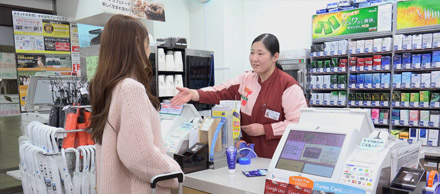
One of the easiest options when you're away from a station.You can top up your card at the cash register of any major convenience store chain in Japan: 7-Eleven, Lawson, FamilyMart, MiniStop, or Daily Yamazaki.
Supported Cards:
Both physical cards and mobile cards.
Steps:
For physical cards:
-
Tell the cashier:
-
"Suica / PASMO / ICOCAcharge please"
-
Or simply "Charge".
-
-
Hand over your card.
-
Pay cash.
-
Receive updated balance.
For mobile IC cards:
-
Walk up to the cashier and present your phone showing the Suica/PASMO screen.
-
Say: "Suica chāji, onegaishimasu" (pronounced: Swee-kah chah-jee, oh-neh-guy-shee-mas). If you are using PASMO or ICOCA, substitute the name (e.g., "PASMO chāji, onegaishimasu").
-
The clerk will ask you to select the amount on their customer-facing touchscreen. Tap the amount you want to load.
-
Hand over the cash to the clerk or insert it into the automated cash terminal at the register.
-
Place your iPhone or Apple Watch on the flat blue/white IC reader card scanner sitting next to the register. Keep it there until you hear the signature electronic chime.
-
Collect your receipt and change.
Convenience stores typically accept cash only for IC card recharges.
⚠️ Note: Minimum recharge is ¥500 at most convenience stores.
Method 4: Recharge at 7-Bank ATMs
7-Eleven has over 26,000 locations in Japan, and almost all of them house a 7-Bank ATM. These ATMs are also located in major train stations, airports, and commercial centers. They are equipped with special physical "bins" or "shelves" specifically designed for contactless cards and phones.
How to do it:
-
Approach any 7-Bank ATM and select your language (e.g., English) on the touchscreen.
-
Tap "Recharge E-Money" (or look for the 交通系電子マネー / IC Transportation Card icon).
-
Unlock your iPhone/Apple Watch. (Pro-tip: If you have Express Mode enabled, you don't even need to unlock it; just hold it close).
-
Place your iPhone or Apple Watch upside down (camera/top of phone facing down) into the illuminated plastic reader tray/pocket on the ATM.
-
On the screen, select "Charge" and choose your desired amount (¥1,000, ¥2,000, ¥5,000, etc.).
-
Insert your cash bills into the ATM’s cash slot.
-
Wait for the processing bar to finish. Do not remove your device until the screen prompts you to.
-
Take your receipt and your newly recharged phone!
Important Rules of Thumb for 2026 Travel
-
Set Your Card to "Express Mode": In your iPhone settings (Settings > Wallet & Apple Pay > Express Transit Card), select your Suica/PASMO. This allows you to tap through station gates instantly without needing Face ID, Touch ID, or even waking up your screen. It even works for up to 5 hours after your phone battery dies!
-
Balance Limit: The maximum amount any Japanese IC card can hold at one time is ¥20,000 (roughly $130–$140 depending on exchange rates). Keep this in mind when trying to top up large amounts.
-
Keep Cash Handy: Many ticket machines and convenience store recharges are cash-only. Always carry some yen for emergencies.
-
UnionPay promotion: Apple Pay users can get offers on Suica/PASMO/ICOCA top-ups from May 1 to August 31, 2026.
Frequently Asked Questions
Can tourists recharge Suica with a foreign credit card?
Yes. Mastercard and American Express generally work best with Apple Wallet top-ups. Some foreign Visa cards may encounter issues.
Can I recharge a physical Suica using a credit card?
Usually no. Most station machines and convenience stores require cash for physical-card recharges.
Can I recharge Mobile Suica with cash?
Yes. Many newer JR ticket machines, convenience stores, and some ATMs support cash loading to mobile IC cards.
What's the minimum recharge amount?
¥1,000 via Apple Pay, ¥500 via convenience stores, and ¥500–¥1,000 at ticket machines depending on the machine.
Can I move my digital card between devices?
Yes, but you can only have the card on one device at a time. Use the Apple Watch app to move it between your iPhone and Apple Watch.